Point of sale · Zahle, Lebanon
The till that counts in dollars and lira.
CBA POS runs your sales, stock and books on the tablet or phone you already have. An Arabic till, USD and LBP side by side on the receipt, Whish and OMT at the counter. Built by an accountant, for Lebanese shops.
Made for how Lebanon pays
Two currencies, two drawers, and every way people pay.
Two currencies
15.00 USD
1,342,500 LBP
Price in dollars, take lira, give change in either. The day's rate is stored with every sale, so last month's figures never move.
Two drawers
USD pile
LBP pile
At closing the till expects each pile on its own and tells you which one is over or short.
Every way people pay
Cash · Whish
OMT · Card
Plus bank transfer and sales on account. Wallet money is tracked apart from the cash in the drawer.
Arabic
منقوشة زعتر
Item and customer names in Arabic print on receipts, invoices and statements. The till screen switches to Arabic in one setting.
What's included
Everything the counter needs, and the paper that goes with it.
One subscription covers all of it. Nothing below is an add-on.
Sell
On the tablet or phone you have
Opens in the browser and installs to the home screen like an app. A PC at the counter works too.
The camera is the scanner
Point the phone at a barcode. No scanner gun to buy, and the owner can create a new item the first time it is scanned.
Keeps selling when the line drops
Sales made without internet are saved on the device and sent by themselves when the signal returns. Never twice.
Prices agreed at the door
For trade and van sales, type the agreed price on a line. The list price stays beside it, and selling under cost needs the owner or a manager.
Paper
Invoices on WhatsApp
Send a proper PDF invoice to the customer's WhatsApp from the phone. No printer needed.
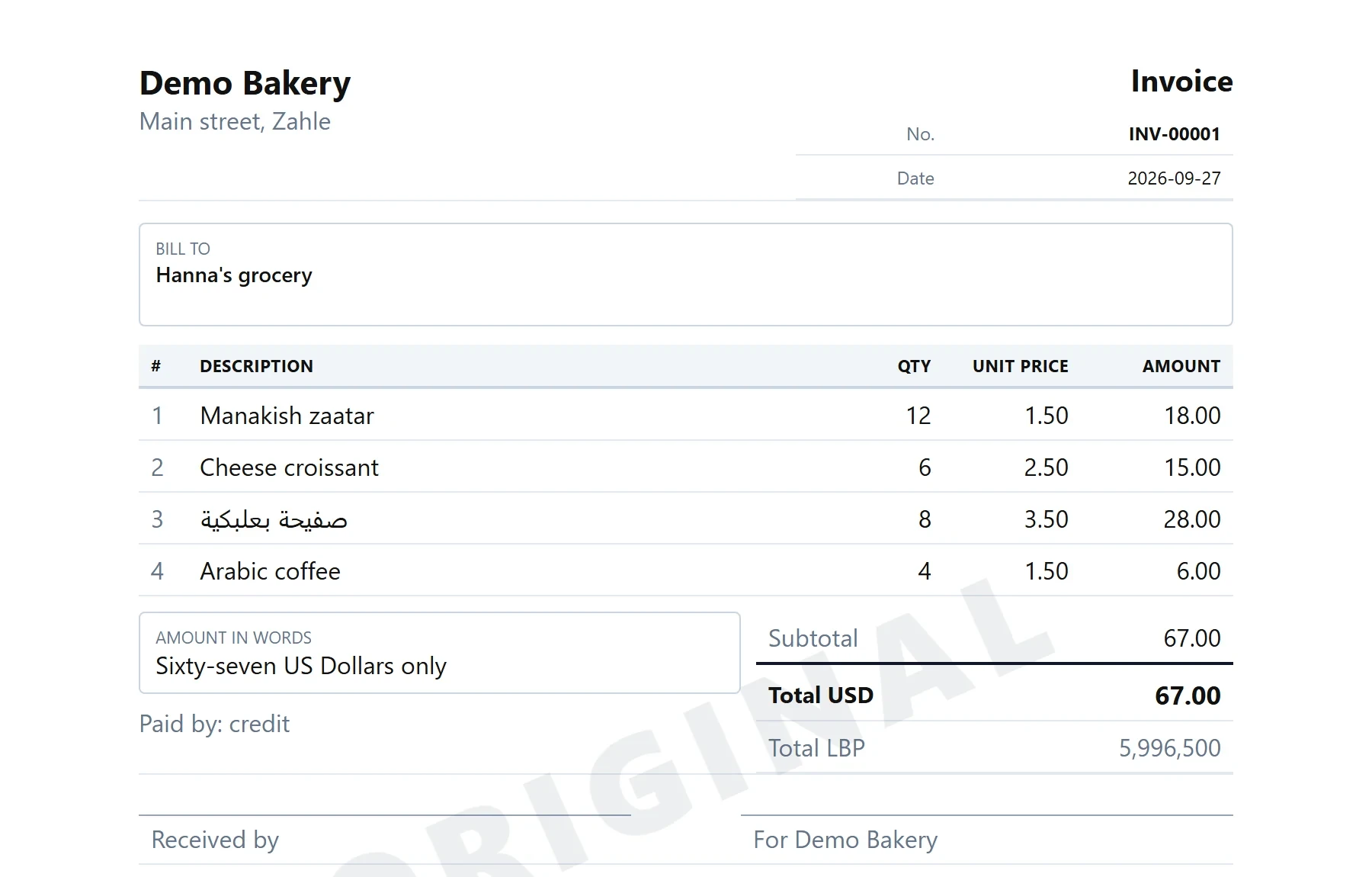
The official A4 invoice
Your legal name, MOF and registration numbers, the buyer's company and VAT number, and the amount in words.
Receipt and payment vouchers
Numbered سند قبض and سند دفع, on A4 or on the 80 mm roll.
Statements of account
Every customer's charges, payments and balance, ready to print, email or send on WhatsApp.
Credit
Customers on account
Sell on credit to a named customer. Balances and an ageing report show who owes what, and since when.
Credit limits
Set a ceiling for each customer. The till refuses a sale that would pass it unless the owner or a manager allows it.
Collect at the door
Take an old balance at the till. It issues a numbered receipt and expects the cash in tonight's drawer.
Money paid in advance
A customer who pays ahead is in credit, and the balance is used up by their next purchases on account.
Stock
Purchases and deliveries
Record supplier bills and receive orders. Short, over and dearer-than-last-time deliveries are flagged.
Recipes and production
Each sale takes its ingredients off stock. Batches you make and goods you throw away are recorded with a reason.
Counts and reorders
Count stock with the phone camera. Minimum and maximum levels produce a suggested order for each supplier.
Sell by the piece or the box
A carton and a single unit can each have their own barcode and price, from one stock figure.
Control
A PIN for each person
Turn on the PIN lock and each person unlocks the till with their own PIN. Refunds, deleted sales, cash taken out of the drawer and discounts over the limit you set then need a manager.
Closing the day
Count the drawer against what the system expects, then send the day's summary to the owner on WhatsApp.
A trail of who did what
Price changes, refunds and deleted sales are written to a log with who did them. With the PIN lock on, every sale and discount also carries the person at the till.
Reports you can hand over
Sales, items, staff and payment methods for any period, in PDF, Excel or CSV.
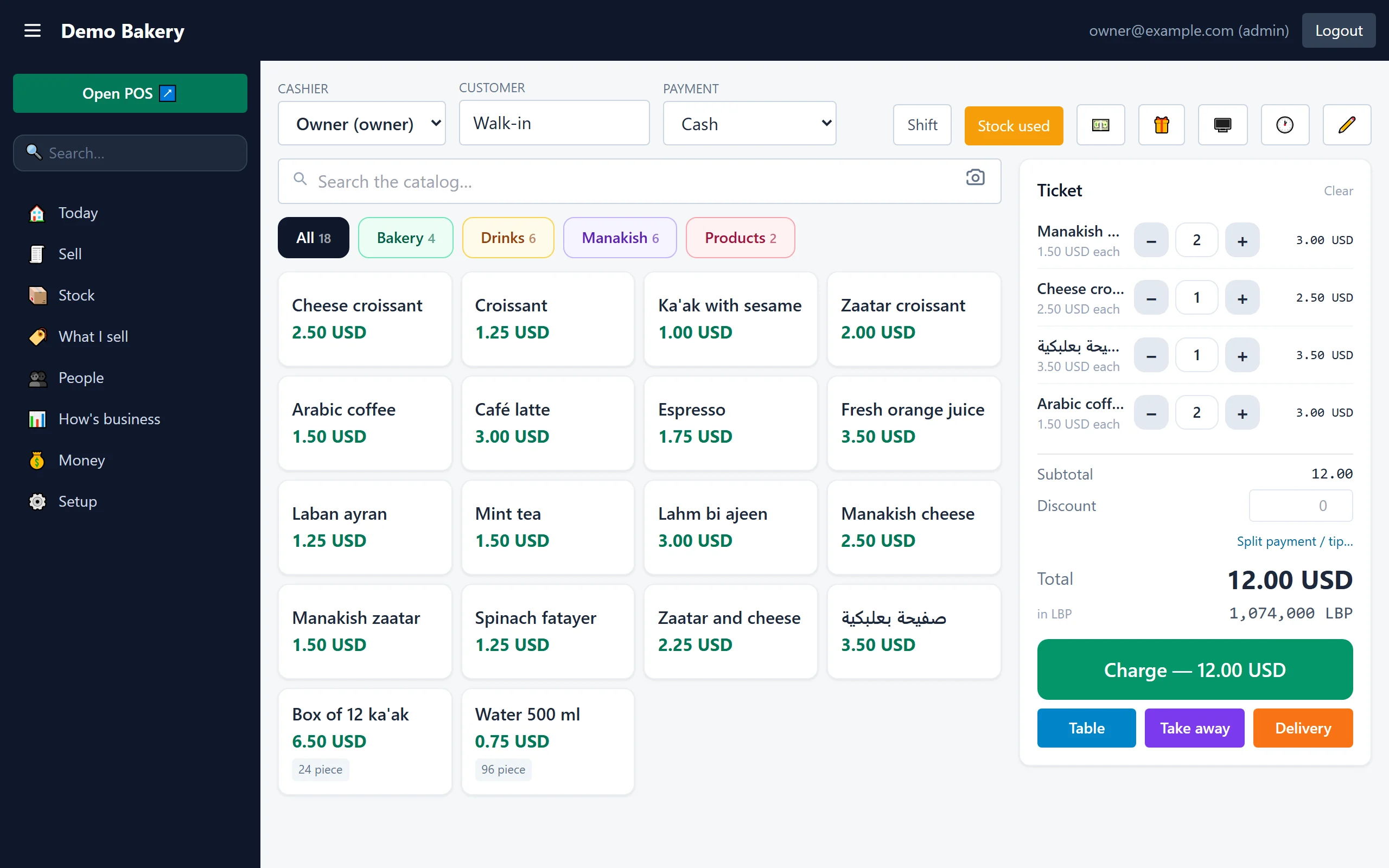
Real screens
This is the actual till, not a mock-up.
Taken from our demo shop. Ask on WhatsApp and we'll open it on your own tablet.
Accounting, included
One button turns the day into journal entries.
Double entry, on the Lebanese chart of accounts
Switch the ledger on and the day's sales, purchases, expenses and payments post to the official Lebanese chart in one step. Your accountant opens a trial balance, not a box of receipts.
VAT kept by nature
Collected and deductible VAT are kept apart, and the return for a finished quarter is prepared from the books.
Journal and general ledger, in USD or LBP
The journal and the ledger of every account, printable and exportable, with statements in either currency.
Or let us keep them for you
CBA is an accounting practice. We can record your bills, close each month and go through the profit and loss with you.
| Account | Debit | Credit | |
|---|---|---|---|
| 531 | CashUSD pile | 412.50 | |
| 531 | Cash10,587,850 LBP at 89,500 | 118.30 | |
| 512 | BanksWhish and card | 64.00 | |
| 7011 | Sales of merchandise | 535.86 | |
| 4427 | VAT collected11% | 58.94 | |
| One day's sales, posted in one step | 594.80 | 594.80 | |
Plans
Start with the till. Add the accountant when you want one.
CBA POS
The system, set up, taught and supported. You run it.
- Everything on this page
- Your items and prices loaded for you
- Training and support on WhatsApp
- Updates included
POS and accounting
Our accountant keeps your books with the data your till already holds.
- Expenses and supplier bills recorded
- Daily sales in the books by payment method
- Monthly profit and loss
- A monthly review with you
Accounting and cost control
Everything in the accounting plan, and a cost controller who finds where profit leaks.
- Recipe usage against what was sold
- Wastage valued and reported by reason
- Stock counts and differences explained
- A monthly cost-control report
Priced for your business. No two businesses need the same work, so we quote each one after a short conversation. Call or message us on +961 71 441 407.
Subscription only. No setup fee, no maintenance fee, no charge per invoice or per user.
Hardware is optional. Use what you have. If we source a tablet or printer for you, you pay the supplier's invoice price and we add nothing.
Who is behind it
Built inside an accounting practice.
CBA POS comes from Chibany Business Advisory, an accounting and cost-control business in Zahle. The numbers at your counter are the same numbers in your books.
Questions
What shop owners ask first.
Do I need to buy new hardware?
No. CBA POS runs in the browser on an Android tablet, a phone, an iPad or a PC. For printed receipts you need an 80 mm thermal printer that your device can print to. We test any printer with the system before you buy it.
What happens when the internet cuts?
You keep selling. Sales are saved on the device and sent by themselves when the connection returns. For shops with weak internet all day, a small box inside the shop can run the till locally and sync with the cloud.
Who owns the data?
You do. Sales, stock, customers and the books can be exported to Excel or CSV at any time during your subscription, and we hand them over in full if you leave.
Is it safe?
Every shop's data is kept separately and the connection is encrypted. Wrong passwords and PINs are limited, changing a password signs that login out of every other device, and sensitive actions such as refunds and deleted sales need a manager and are recorded.
Can I run more than one branch?
Yes. Each branch has its own till and stock, the owner sees them together, and stock can be moved from one branch to another.
Can my own accountant see the books?
Yes. We can give your accountant a login that opens the accounts and nothing else, so they never touch the till.
Is it in Arabic?
The till screen can be set to Arabic, and item names, customers and notes typed in Arabic print correctly on receipts, invoices and statements.
Contact
See it on your own tablet.
Send a message on WhatsApp. We'll set a time, open the till on your device and load a few of your own items, so you see how it works in your shop.
- WhatsApp and phone
- +961 71 441 407
- jad.chibany@gmail.com
- Office
- Zahle, Lebanon